
Context Server Internals
Este conteúdo não está disponível em sua língua ainda.
This page explains what happens under the hood when an agent queries your data. You don’t need to understand any of this to use Agent Context — but if you’re a technical user wondering how the system delivers fast, precise answers from multiple data sources, read on.
Architecture
Section titled “Architecture”Each organization gets a dedicated Context Server — a cloud VM running a federated SQL query engine. This server is not directly accessible to end users. It is managed entirely by Rebyte and exposed through two interfaces:
- HTTP interface — REST API for SQL queries (
POST /v1/sql) and catalog discovery - FlightSQL interface — Apache Arrow FlightSQL gRPC protocol for high-throughput, columnar data transfer
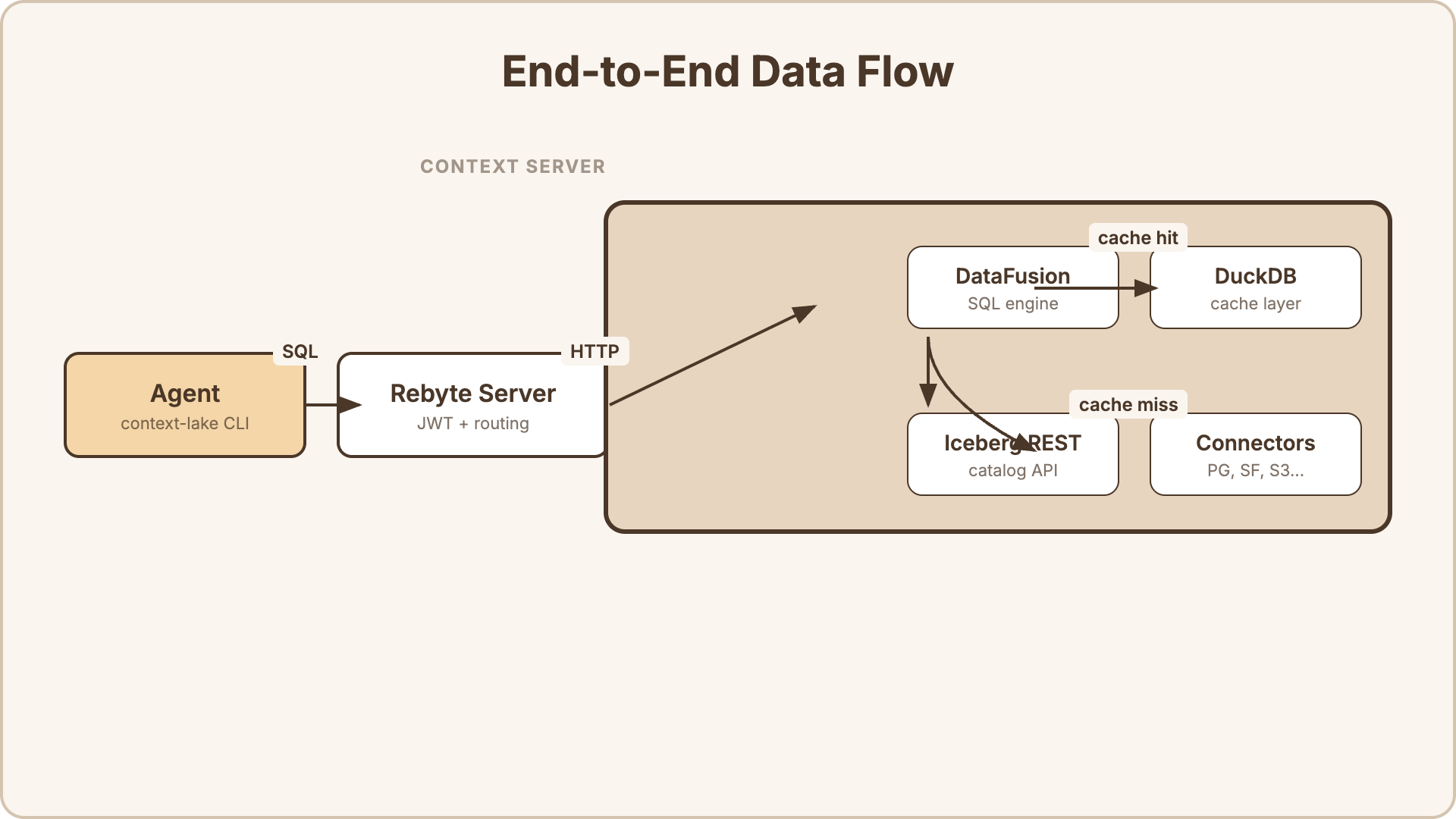
The key components inside the Context Server:
- Apache DataFusion — the SQL execution engine. Parses SQL, plans queries, and coordinates execution across sources.
- DuckDB — an embedded analytical database used as the caching layer for materialized views.
- Connectors — source-specific adapters that translate DataFusion’s query plan into native queries for each data source (PostgreSQL wire protocol, Snowflake REST API, S3 file reads, etc.).
- Iceberg REST Catalog — a standard catalog API that lets agents discover available tables and their schemas.
One Context Server per organization. All users and agents in the org share the same server. The VM auto-pauses when idle and resumes in seconds when needed.
Two Ways to Access Data
Section titled “Two Ways to Access Data”When you connect a data source to Agent Context, there are two ways agents can query it:
-
Query push-down — the agent’s SQL query is forwarded directly to the source database. The source does the filtering, joining, and aggregation. Best for live data that must be up-to-the-second accurate.
-
Cached views — you define a SQL query that combines data from one or more sources. The result is materialized into a local DuckDB cache on the Context Server. Agents read from the cache for instant results. Best for complex joins, aggregations, and dashboards where sub-second freshness isn’t required.
You can use both in the same organization. Raw datasets use push-down by default. Views use caching by default.
Query Push-Down
Section titled “Query Push-Down”When an agent queries a dataset directly, the engine pushes predicates down to the source database. It doesn’t pull all data into memory and filter locally.
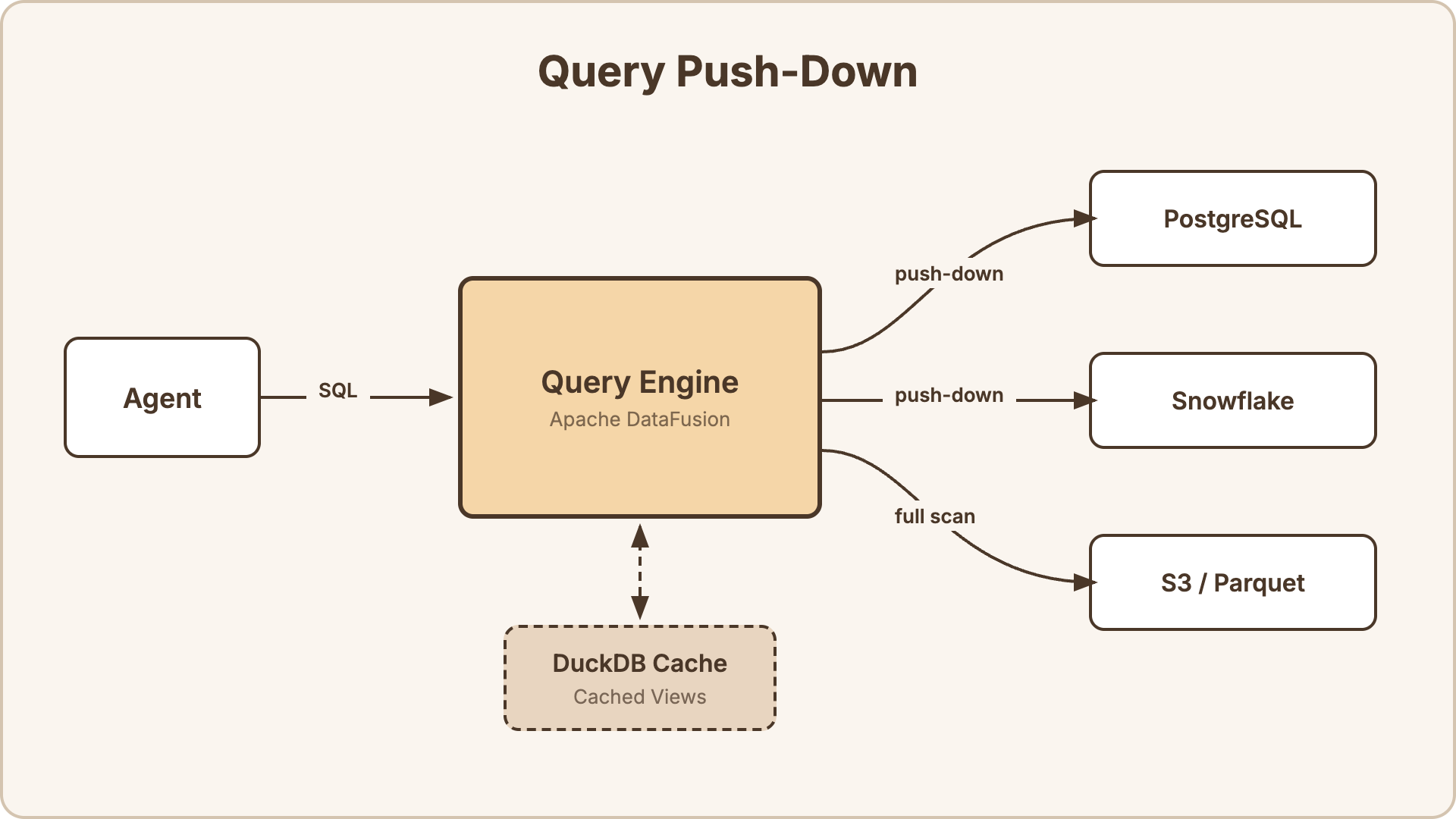
How it works:
- The agent sends a SQL query:
SELECT name, email FROM "customers" WHERE country = 'JP' AND created_at > '2025-01-01' - DataFusion parses the SQL and builds a query plan.
- The
customerstable is backed by a PostgreSQL connector. DataFusion pushes theWHEREclause down to PostgreSQL. - PostgreSQL executes
SELECT name, email FROM customers WHERE country = 'JP' AND created_at > '2025-01-01'natively — filtering happens at the source, not in the engine. - Only the matching rows are returned to DataFusion.
Push-down support by source type:
| Source | Push-down | What gets pushed |
|---|---|---|
| PostgreSQL | Yes | WHERE, LIMIT, projections |
| MySQL | Yes | WHERE, LIMIT, projections |
| Snowflake | Yes | WHERE, LIMIT, projections |
| Databricks | Yes | WHERE, LIMIT, projections |
| S3 / Parquet | Partial | Column pruning, row group filtering (Parquet statistics) |
| S3 / CSV, JSON | No | Full file scan, then filter in DataFusion |
| Local files | No | Full scan |
For database sources, push-down means the source database does the heavy lifting. For file-based sources, DataFusion reads the files and applies filters locally — Parquet files benefit from columnar pruning and statistics-based row group skipping.
Cached Views
Section titled “Cached Views”A view is a SQL query that joins, aggregates, or reshapes data from one or more sources. Views are materialized into DuckDB — an embedded analytical database on the Context Server’s disk — so agents read from a fast local cache instead of hitting your sources on every query.
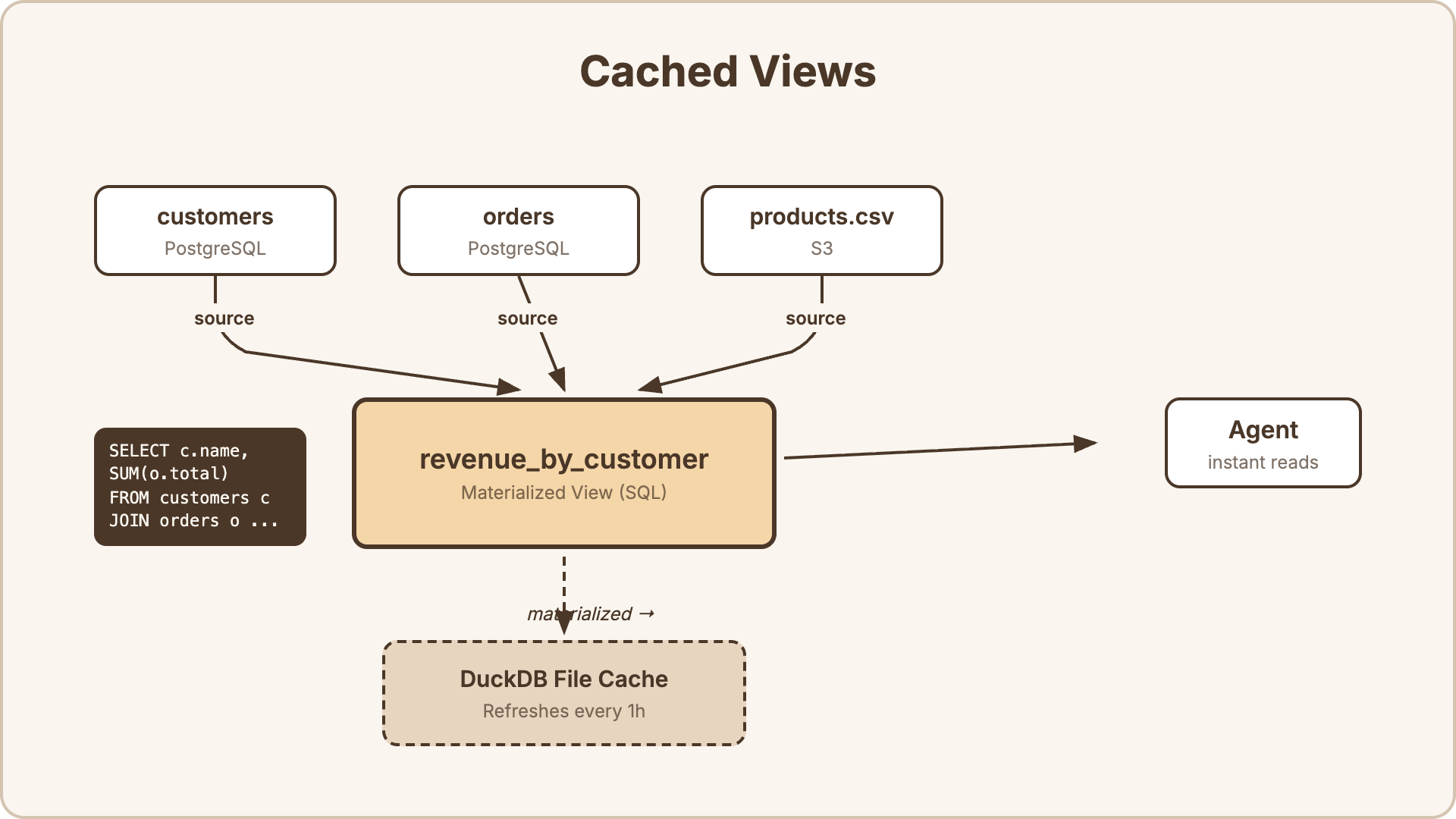
How it works:
- You define a view with a SQL query (e.g., join
customersfrom PostgreSQL withordersfrom PostgreSQL andproducts.csvfrom S3). - The engine executes the SQL against the live sources and writes the result into a DuckDB file on disk.
- When an agent queries the view, it reads from DuckDB — instant, no network round-trips to your sources.
- The engine refreshes the cache on a configurable interval (5 minutes to 24 hours, or manual-only).
Refresh behavior:
| Interval | Behavior |
|---|---|
5m, 15m, 1h, 6h, 24h | Engine re-executes the view SQL at this interval and replaces the DuckDB cache |
manual | Cache only refreshes when you restart the engine or update the view |
Refreshes are full materializations — the engine re-runs the entire SQL query and replaces the cache file. Retry logic with jitter prevents thundering herd problems when multiple views refresh simultaneously.
Why DuckDB? DuckDB is an embedded columnar database optimized for analytical queries. It handles aggregations, joins, and scans over millions of rows in milliseconds — without requiring a separate database server.
SQL Dialect
Section titled “SQL Dialect”Agent Context uses Apache DataFusion SQL — a standard SQL dialect compatible with most ANSI SQL.
Supported features:
- Aggregations:
COUNT,SUM,AVG,MIN,MAX,STDDEV,PERCENTILE_CONT - Window functions:
ROW_NUMBER,RANK,DENSE_RANK,LEAD,LAG,NTILE - Common table expressions (CTEs):
WITH ... AS (...) - Joins:
INNER,LEFT,RIGHT,FULL OUTER,CROSS - Set operations:
UNION,INTERSECT,EXCEPT - Subqueries in
FROM,WHERE,SELECT CASEexpressions,COALESCE,NULLIF- Date/time functions:
DATE_TRUNC,DATE_PART,NOW,INTERVAL - String functions:
CONCAT,UPPER,LOWER,TRIM,SUBSTRING,REGEXP_MATCH - Type casting:
CAST(x AS type),x::type
The full SQL reference is at Apache DataFusion SQL documentation.
Access Control
Section titled “Access Control”Every query is authenticated with a scoped JWT token. The token encodes exactly which tables the user can access.
- Admin users receive a token granting access to all datasets and views.
- Regular users receive a token scoped to their accessible tables — determined by dataset/view visibility settings and explicit ACL grants.
- The query engine validates the token on every request. Queries against unauthorized tables are rejected.
Tokens are generated by the Rebyte server when an agent calls context-lake connect, and are cached for 24 hours.