How We Built Sub-Second Sandbox Startup
A deep dive into our two-tier snapshot architecture that delivers 400ms hot starts and permanent filesystem persistence — with zero data loss.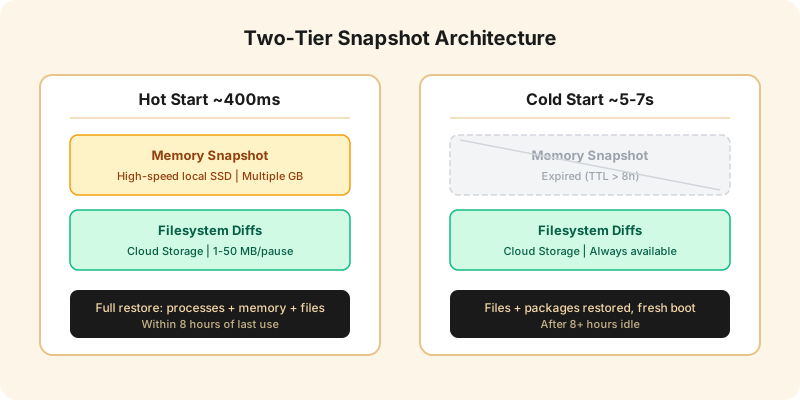
Every Agent Computer on Rebyte is persistent. You can close your browser, come back a week later, and your files are exactly where you left them. But persistence is only half the story — the other half is speed. When you reconnect, we want it to feel instant.
This post explains how we achieve sub-second startup for active sandboxes while keeping storage costs low and guaranteeing zero data loss.
The Problem
Each sandbox is a Firecracker microVM with its own filesystem, memory, and running processes. When a user disconnects, we need to save the VM state so it can be restored later. The naive approach — dump everything to cloud storage on every pause — creates two problems:
- Slow startup. Downloading multiple gigabytes of memory state from cloud storage takes seconds, sometimes longer.
- Expensive storage. Memory state for a single VM can be several gigabytes. Storing that in cloud storage for every pause across thousands of sandboxes adds up fast.
We needed a design that is fast for active sessions, reliable for long-term persistence, and cost-effective at scale.
Two-Tier Architecture
Our solution splits the saved state into two tiers based on durability requirements.
Tier 1: Filesystem — Durable, Cloud Storage
The VM's root filesystem uses a copy-on-write overlay that tracks every block the VM modifies. On pause, we export only the changed blocks as a compact diff — typically 1–50 MB for a session with moderate file changes.
These diffs are uploaded to cloud storage immediately. They are small, fast to upload, and provide the foundation for data durability. Combined with the base template image, we can reconstruct the complete filesystem at any point in the sandbox's history.
On resume, each disk read is routed to the correct source — base image or diff layer — with lazy loading. Only the blocks the kernel actually reads are fetched, not the entire disk.
Tier 2: Memory — Ephemeral, High-Speed Local SSD
The VM's memory state — all running processes, open file handles, network connections, in-memory caches — is captured using Firecracker's snapshot API with dirty page tracking. For a typical VM, the memory state is multiple gigabytes.
Uploading several gigabytes to cloud storage on every pause would be slow and expensive. More importantly, memory state only has value for fast resume — if it's gone, we can always cold boot from the filesystem.
So we keep memory state on a high-speed local SSD only. No cloud upload. This provides sub-second startup for active sessions, and a TTL-based cleanup removes it after 8 hours of inactivity.
Startup Flow
When a user reconnects to a paused sandbox, the system makes a single decision:
Local memory state exists?
  YES → Full restore (hot start, ~400ms)
  NO  → Fresh boot from filesystem (cold start, ~5–7s)
The system checks the local disk and decides. One code path, one decision point, automatic fallback.
Hot Start (~400ms)
The memory state is loaded from the local SSD and the VM is restored in place. All processes resume exactly where they left off. The filesystem is reconstructed lazily — blocks are fetched from cloud storage or local cache only when the kernel reads them.
The 400ms breaks down roughly as:
- 50ms — Set up filesystem layers
- 100ms — Restore VM from memory state
- 200ms — Kernel resumes, health check
- 50ms — Network setup
Cold Start (~5–7s)
Without local memory state, the VM boots fresh from the base image with the filesystem overlay providing all the user's files. The kernel boots from scratch, services start, and the environment initializes.
The 5–7 seconds breaks down roughly as:
- 500ms — Set up filesystem diff layers
- 200ms — Firecracker cold boot
- 3–5s — Kernel boot, services init
- 500ms — Health check and warmup
After cold boot, all files in the workspace are intact. Running processes are gone — they restart naturally as the user interacts with the sandbox.
Incremental Filesystem Storage
Each pause adds a new layer to the filesystem diff chain. After hundreds of pauses, the system references many diff layers. On resume, each disk read is routed to the correct layer.
This sounds expensive, but in practice it works well:
- Reads are lazy. Only blocks the kernel actually touches are fetched. A typical boot reads a small fraction of the total disk.
- Local caching. Once a block is fetched from cloud storage, it is cached locally. Subsequent reads hit the cache (~7ms) instead of cloud storage (~400ms).
- Diffs are small. Each layer only contains the blocks that changed in that session — typically 1–50 MB.
Cleanup
A background task periodically cleans up expired memory state from local SSDs. Any state older than 8 hours is removed. Active sandboxes are never touched.
Cloud storage is permanent. Filesystem diffs are small and provide the durable record of the sandbox's state. The total cloud storage cost for a sandbox with 100 pauses is typically under 2 GB.
The Result
| Metric | Value |
|---|---|
| Hot start latency | ~400ms |
| Cold start latency | ~5–7s |
| Memory state size | Multiple GB (high-speed local SSD only) |
| Filesystem diff size | 1–50 MB per pause (cloud storage) |
| Data loss risk | Zero |
| Max pause/resume cycles | Unlimited |
The key insight is that memory state and filesystem state have fundamentally different durability requirements. Memory state is valuable but ephemeral — it makes startup faster but is not essential. Filesystem state is essential — it is the user's data and must never be lost.
By separating these two concerns, we get the best of both worlds: sub-second startup for active sessions and reliable persistence for everything else.